12/21/2014

esProc Improves Text Processing – Set Operations on Big Files

It is common to perform set operations on big files in text processing. For example, find different rows between two files. The code for handling the operations with command line grep or cat command is simple but inefficient. While the operational efficiency is high when high-level languages are used to handle the operations, the code is difficult to write.

esProc supports performing set operations on big files and multithreaded parallel computing. Its code is concise and its performance is remarkable. The following examples will show the esProc method in detail.


file.1txt and file2.txt hold a large number of strings respectively. Find their common rows (that is, compute the intersection). Some of the data are shown as follows:

Both files are big
When both files are too big to be loaded into the memory, esProc's way of cursor merge can be used to realize the intersection operation. The code is as follows:

A1, B1Open the files as cursors. cursor function doesn't import all the data into the memory, it opens a file in the form of a cursor (stream) without the memory footprint. The function uses default parameters to import all the fields and to name the new columns automatically as _1, _2, _3…_n, with tab being the column separator. There is only one field - _1 - in this example.

A2=[A1.sortx(_1),B1.sortx(_1)].merge@xi(_1)
The above code uses the merge operation to find the common rows of the two files, that is, to compute the intersection. A merge operation requires ordered data, so sortx function is used to sort the cursors first. The corresponding code is A1.sortx(_1) and A2.sortx(_1), in which _1 is the default field name in the files. merge function is used to merge multiple groups of data (two groups as with this example). Without parameter options, it merges the sets in the memory; the use of parameter option @x means to merge the cursors and @i means that the merge result is the intersection.

Notice that the result of A2 is still a cursor without the memory footprint. Only when the computation involves functions like export, fetch, groups and etc. will esProc engine allocate suitable buffers and automatically convert the cursor computing into in-memory computing. 

A3=file("E:\\result.txt").export(A2)
This line of code writes cursor A2 to a file. export function can be used to write both the in-memory data and cursors to files. Here default parameters are used, that is, no column name, using tab as the column separator, overwriting instead of appending files and writing as text files instead of binary files. Open result.txt and you can see some of the data as shown below:

Actually the above three-step esProc code can be combined into a single line of code: A1=file("e:\\result.txt").export([file("E:\\file1.txt").cursor().sortx(_1),file("E:\\file2.txt").cursor().sortx(_1)].merge@xi(_1))   

In addition to the intersection operation performed in this example, there are also operations of union, concatenation and difference. Just to modify the option of merge function in A2 to realize them. For example, union file1.txt and file2.txt and remove the duplicate members to get their union. Function option @u can be used to compute the union with the following code: [A1.sortx(_1),B1.sortx(_1)].merge@xu(_1). Their union is as follows:

By not removing the duplicate members, concatenation will be computed. The code is [A1.sortx(_1),B1.sortx(_1)].merge@x(_1), which shows the real meaning of merge operation. The result is as follows:


Use function option @d to compute the difference, the data which are included in file1.txt but not included in file2.txt. The code is [A1.sortx(_1),B1.sortx(_1)].merge@xd(_1). Result is as follows:

Note: The commutative law doesn't apply to difference operation. So the code for getting the data which are included in file2.txt but not included in file1.txt is [B1.sortx(_1),A1.sortx(_1)].merge@xd(_1). The result is as follows:

One file is big, the other is small
When there is only one big file that runs out of the memory, the smaller one can be loaded into the memory and then use a hash table to perform the set operations. Thus the efficiency can be increased significantly. esProc code is as follows:

A1Open the files as cursors.

A2=file("e:\\file2.txt").import(). This line of code imports the smaller file2.txt into the memory entirely. Similar to cursor function, import function’s default field names are _1 and _2 as well. Click B1 in esProc's Integrated Development Environment (IDE) to see the computed result of the current cell:

B2>B1.primary(_1).index()
The above code defines a primary key for B1 and creates a hash index. The query speed can be increased greatly in this way. B1 and B2 can be combined into a single line of code : B1=file("E:\\ file2is.txt").import().primary(_1).index()

A3=A1.select(B1.find(~._1))
This line of code selects the common data of cursor A1 and cursor B1, which is computing the intersection. select function is used to execute the query statement and eligible data will be selected. In the function, ~ represents the current record.

The query criterion is B1.find(~._1), meaning to find in B1 the _1 field of the current record of A1.
Notice that the result is still a cursor when the code is executed.

A4=file("E:\\result.txt").export(A3). This line of code writes the final result into a file.

When computing difference, modify the code in A3 to A1.select(!B1.find(~._1)), which selects from A1 the rows which are not included in B1.
To compute the union of file1 and file2, first compute the difference of file1 and file2 and then union it with file2.

conj function in the expression [A3,B1.cursor()].conj@x() in A4 can concatenate multiple sets (which is concatenation operation) – [[1,2,3],[2,3],[]]=[1,2,3,2,3], for example. Function option @x is used to concatenate the data in multiple cursors. Since B1 is not a cursor, cursor function should be used to convert it to a cursor, i.e. B1.cursor(). This is faster than importing data from the file.

Compute a big file and a small one in parallel
The sequential computation is used in the above case, but parallel computation can further enhance the performance. The method is to import files using multithreads. Each thread accesses a part of the file with a cursor, and meanwhile performs a set operation and finally combines the result of each cursor together.

Test a big file of 2.77G size and a small one of 39.93M size under the same hardware environment. It takes an average of 85 seconds to accomplish the sequential computation while it takes an average of 47 seconds to accomplish it with parallel computing. The speed has nearly been doubled. As the set operations are not that complicated in themselves, the computation hits a bottleneck in the hard drive’s ability to import data. The performance will be improved more greatly while the operation is getting more complex.
esProc code for parallel computing is as follows:

B1Import the small file into the memory, define a primary and create an index.
A2=4. A2 represents the number of segments into which a file is going to be divided. Here the number is 4. Generally the number of segments should not exceed the number of CPU cores; otherwise the tasks will be queued for processing and the speed won’t be really increased. The maximum parallel number can be configured in the environment option.

A3=A2.(file("e:\\file1.txt").cursor@z(;, ~:A2))
The above code generates four cursors according to the number of segments. A2.(express) means computing the expression with members of A2 in order. In the parentheses, “~” can be used to represent the current member. Generally A2 is a set, like ["file1", " file2"] or [2,3]. If members of the set are a series of consecutive numbers beginning from 1, like [1,2,3,4], A2 can be abbreviated to 4.( express), as with the code in this example.

In the expression - file("e:\\file1.txt").cursor@z(;, ~:A2) - surrounded by the parentheses, cursor function uses @z option to divide the file into multiple segments and to import one of them using a cursor. ~:A2 means that the file will be roughly divided into 4 segments (A2=4), with "~" representing the current member in A2. Thus the cursors correspond to the first, the second, the third and the fourth segment of file respectively.

The reason for dividing a file "roughly" is that half rows will appear with the exact division. esProc can make sure of importing whole rows automatically by skipping the head incomplete row and making up the tail incomplete row, this is tedious to realize in Java.

A4=A3.(~.select(B1.find(~._1))). This line of code computes intersection on each cursor in A3 and the result is a set of cursors.

A5=A4.conj@xm(). This line of code combines the multiple cursors in A4 in parallel.

A6=file("e:\\result.txt”).export(A5). The code writes the final result into a file. The intersection operation has been accomplished at this point. You can refer to the previous examples to compute difference and union.

esProc can be used alone or be integrated into a Java program. The following is to integrate the esProc script into the Java program through JDBC. The Java code is as follows:
         // create a connection using esProc jdbc
         Class.forName("com.esproc.jdbc.InternalDriver");
         con= DriverManager.getConnection("jdbc:esproc:local://");
         // call esProc script, whose name is test.dfx
         st =(com.esproc.jdbc.InternalCStatement)con.prepareCall("call test()");
         st.execute();//execute esProc stored procedure, or input a parameter and output the computed result

For the simple script as with the first example, it can be embedded in the Java code and executed directly, without writing the script file (text.dfx). The corresponding Java code is as follows:
ResultSet set=st.executeQuery("file(\"e:\\result.txt\").export([file(\"E:\\file1.txt\").cursor().sortx(_1),file(\"E:\\file2.txt\").cursor().sortx(_1)].merge@xi(_1))");

12/18/2014

Related Computing in esProc - Primary Keys and Index Function

In an esProc table sequence, a single or multiple fields can be used as a primary key. We can make query based on the primary key using some special functions, which can both simplify the code and increase computational performance effectively.

1.find and pfind

Primary keys are common used in database tables. The value of a primary key field is used to uniquely identify a record, so primary keys must not contain identical values, which is a mandatory rule in many databases.

In esProc, it is assumed that the primary key has unique value among the records. But no mandatory check will be executed and there won't be an error reporting even if there are identical primary key values. Both T.find(vfunction and T.find(v) function can be used to query records in table sequence T according to v, the primary key value. find returns the first record found and pfind returns the sequence number of this record.

It is not a must to define a primary key. When no primary key is defined in esProc, the first field will be used as the primary key. If specified fields are needed to be defined as the primary key, T.primary(Fi,…) function, which means defining Fi,… as the primary key of table sequence T, will be used.

Usually, conventional position functions T.select() and T.pselect() are used to query records in a table sequence. Now we’ll compare usages of this pair of functions with pfind and find.


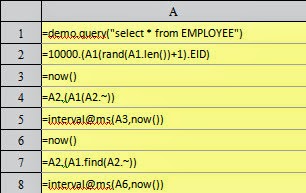
Here table EMPLOYEE in demo database is the table sequence on which query will be executed. Add FullName field to it so that the employees’ full names can be used to make query:

In order to show the performance advantages of using the primary key to query data, 10,000 full names will be generated randomly and pselect and pfind will be used respectively to make query according to these full names. Compute the time these two methods will take:

Based on the same data, A5 and A9 use pselect and pfind respectively to query positions of the records in the table sequence. In A9, primary function is used to set the primary key for the table sequence before pfind starts to work. A6 and A10 compute respectively the milliseconds the queries will take:

But the query results in A5 and A9 are same:

Using similar method, we can compare select function and find function. To keep in line with find function, @1 option is used in select function to get the first result and return it:

A6 and A10 compute respectively the milliseconds the queries will take:

Still, the query results in A5 and A9 are same:

It can be seen easily from the comparison that the query functions based on the primary key are much more efficient than conventional position functions.

2.Primary key and the index table

Why, in esProc, will the efficiency increase significantly when the primary key is used to make query? The reason is that the index table of the primary key has been used for computing.

During calling a primary function, or making query based on the primary key in a table sequence without an index table for the first time, an index table will be generated according to the primary key. While the index table is being generated, a hash table will be created according to all values of the primary key, which will divide primary key values into many groups by their hash values. These hash values are the corresponding group numbers.

Normally, when we query a certain record in a table sequence according to the field value, we need to examine the records one by one until the target is found. For a table sequence containing n records, an average of n/2 examinations are needed.

Thanks to the index table, it would be different to query a certain record in a table sequence according to the value of the primary key field. The hash values will be computed first according to the primary key values, which enable us to find out directly the corresponding groups in the index table. Then we just need to examine records of the same group. In the same way, for a table sequence containing n records, if its primary key values are distributed in k groups according to hash values, only an average of n/2k comparisons are needed. Using this method, despite hash values must be computed before an index table is generated and the query is executed, the number of comparisons is reduced significantly, and in particular, the index table needs to be generated only once. Therefore, the more the data in a table sequence and the times needed for a query, the higher the efficiency.

During computing, T.index(n)function can be used to create an index table for T’s primary key in advance. n represents the length of the index table. Default value will be used if there is not a defined length.

What we should know is that the reason why the functions for query based on primary key values, such as find and pfind, can enhance computational performance effectively is that an index table has been created for the primary key in a table sequence. Therefore, if the primary key itself can be used as the index to locate records, it is unnecessary to create an index table. EID field itself in the above-mentioned table EMPLOYEE, for example, represents the positions of records in the table sequence, thus it is more efficient to use it to query the corresponding records:

This time 10,000 sequence numbers of employees are generated randomly. A4 finds the corresponding records directly according to these sequence numbers; A7 still uses find function to find records. A5 and A8 compute respectively the time the two methods will take:

We can see that it is much faster to locate records using sequence numbers directly. Because this method doesn’t compare field values, nor does it compute the hash values and create an index table. The query results in A4 and A7 are same:

Thus it can be seen that suitability should be taken into consideration if the index function of the primary key in a table sequence is to be used to increase efficiency in esProc.

3.switch function

Besides find function and pfind function, switch function query records according to the primary values too. It will also use the index table of the primary key automatically in dealing with the operation. For example:

Both A2 and A3 contain personnel information imported from binary text file PersonnelInfo, as shown below:

A4 contains states information:

In both A6 and A9, State field of PersonnelInfo is switched into corresponding states information. Their difference is that A6 uses select@1 function while A9 uses switch function. A7 and A9 compute respectively the time the two methods will take:

After the code in the cellset is executed, values of A2 and A3 are same, as shown below

State field has been switched into corresponding records in states information table.

Before switch is executed, an index table will also be created for corresponding fields in the table sequence. In this example, an index table is created for ABBR field of states information table in A4 to increase the matching efficiency. So switch function should be properly used when foreign key fields for referencing are to be generated. 

12/17/2014

esProc Simplifies SQL-style Computations – Multi-layered Data Grouping with Specified Criteria

During database application development, we are often faced with complicated SQL-style computations, to which the multi-layered data grouping with specified criteria belong. In SQL, the key method for realizing the operation is to group the source data according to specified criteria using left join statement. The problem is that this method usually involves handling data grouping and summarizing, inter-row computations, completing data, and, moreover, multi-layered data. So we need to write rather complicated SQL statements to express it.

In esProc, the operation can be realized with simple and easy code. Its ability will be shown through the following example.


Here is a table – stocklog – in which all the warehouse-in and -out records of various products every day are stored. Now we are asked to produce a stock report of all the products for every day of a specified time period. Some of the records in stocklog are as follows:

In the table, if the INDICATOR value of a record is null, it is a warehouse-in record; if the INDICATOR value is ISSUE, it is a warehouse-out record. Note that though some dates are missing, which means there are no corresponding records in these days, the stock report must include all the dates continuously.

The stock report includes the following categories for each product each day: the opening stock (Open), warehouse-in quantity (Enter), stock in its highest level (Total), warehouse-out quantity (Issued) and the closing stock (Close). The "Open" of the current day is the "Close" of the day before; "Enter" and "Issued" come from stocklog; "Total" is equal to "Open+Enter"; "Close" is equal to "Open+Enter-Issued" or "Total-Issued".

esProc script is shown below:

A1Query the database and compute the total Enter and toal Issued of each product each day based on stocklog. As only data grouping and summarizing is needed in this step and the computation is simple, a SQL statement can be used to perform it. Notice that the two parameters – start and end – correspond respectively to the two quotation marks in the SQL statement and represent the time periods passed from the external, which may be a Java program or a reporting tool. Suppose values of start and end are 2014-04-01 and 2014-04-10 respectively, result of A1 will be as follows:

A2=A1.group(Lname)

This line of code groups the result of A1 by Lname, with each group being all the records of the Enter and Issued of each product each day of the specified time period. Please note it is not necessary to summarize each group of data. Result of A2 is shown in the left part of the following figure and detail data of each group are listed to the right.

esProc provides two functions for grouping data – groups and group. Similar to SQL's group by statement, groups groups and summarizes data. While group only groups data without summarizing them, which is a function SQL hasn't.

The final result should include the stock statistics of all days during the time period specified by start and end. But, in the source data, not all days have the warehouse-in and -out records, thus the result of A2 should be aligned with the continuous dates. The following code is to generate the time sequence first.

B2=periods(start,end,1)
periods function can be used to create a time sequence, which requires three parameters: start, end and interval. By default, a sequence of dates will be generated. By using other options, a time sequence of years, seasons, months and ten-day periods can also be created. Result of A3 is as follows:
A3=for A2. This is a loop statement, which performs loop on the result of A2, with each loop aiming at a product.

B3-B6 is a loop body that aligns each product's warehouse-in and -out records with the time sequence in B2 and then computes each product's stock statistics each day and finally append the result to B6. Note that a loop body in esProc is represented visually by an indentation instead of the braces or identifiers like begin/end.

B3=A3.align(A3,Date)
This line of code aligns the current product's warehouse-in and -out records with the time sequence in B2. Note that A3 wears two hats; it is both a loop statement and a loop variable, that is, the current product'’s warehouse-in and -out records. Take item3 as an example, the left part of the following figure shows the records before alignment and the right part shows the records after it: 

B4>c=0
It assigns an initial value – zero – to the variable c, which represents the Open field in each record of the current product. The Open field value of the initial date is zero and will be modified continuously in B5.
B5=B3.new(A3.Lname:Lname,B2(#):LDate, c:Opening, Enter,(b=c+Enter):Total,Issue,(c=b-Issue):Close)

This line of code computes the stock statistics. B3.new(…) means creating a new table sequence, that is, the stock statistics of the current product, based on the result of B3. The new table sequence has 7 fields:

A3.Lname:Lname ---- Fetch Lname field from A3 – the warehouse-in and -out records of the current product. The new field is named Lname.

B2 (#):LDate ---- Insert the time sequence in B2 into the new table sequence in order and make it a new field with the name LDate. Note that # represents the record numbers in A3 and B2(N) represents the Nth record in B2. So B2(#) means inserting B2 into the new table sequence according to the record numbers in A3.

c:Open ---- Make variable c the value of Open field. In the first record, c is zero.

Enter ---- Take the Enter field in B3 directly as a new field. Because the new table sequence is created based on the result of B3, it is unnecessary to rename the new field as Lname field was named.

(b=c+Enter):Total ---- Compute Total field according to the formula Open+Enter. The expression here is surrounded by parentheses to make it clearer.

Issue --- Take Issue field in B3 directly as a new field

(c=b-Issue):Close --- Compute Close field according to the formula Total-Issued. Note that variable c has been modified so that it will be qualified for computing the next record as the value of Open field, which is got according to the business rule that “Open” of the current day is equal to “Close” of the day before.

Take item 3 as example, result of B5 is as follows:

B6=@|B5
Continuously, this line of code appends the result of B5 to the current cell B6, which is represented by @. The final result is as follows:

B6 is the final result of this example.

In addition, the esProc script can be called by the reporting tool or a Java program in a way similar to that in which a Java program calls an ordinary database. The JDBC provided by esProc can be used to return a computed result in the form of ResultSet to the Java main program. Please refer to related documents for details.

12/16/2014

esProc Simplifies SQL-style Computations – Multi-level Relationships

Multi-level relationships are one of the complicated SQL-style computations which we often need to deal with during database application development. The relatively abstract SQL JOIN statement is suitable for expressing simple relationships between tables, but once the multi-level relationships are involved, the code becomes rather complicated. esProc uses object references to express the relationships, thus its code is easier to read. The following example will illustrate this.


Table channel stores the correspondence between a certain website's all channels and their parent channels, which are respectively represented by id field and parent field. There are four levels of correspondence at most and root represents the website itself (i.e. the root node). Please list a certain channel's next level, next two and three levels of channels, which will be separated from each other by commas, according to the input parameters. Some of the data of channel are as follows:

esProc code:


A1: Query channel and name the selected data as data, part of which are as follows:

B1: =data.switch(parent,data:id). This line of code establishes a self-join. switch function is used to switch the parent field to the corresponding records in data, as shown below:


After the switch, parent.id can be used to refer to a parent channel, and parent.parent.parent.id represents the channel three levels up. This kind of self-join can be expressed with SQL JOINs, but confusion could arise when there are many levels of relations.

A2: =create(id,level,sub). This line of code creates an empty table sequence for storing the final computed result. Different from data - the explicit definition variable, cell name A2 is by default the variable name of the table sequence. The current value of A2 is as follows:

A3: =data.select(parent.id==arg1 ). This line of code selects records in which the parent channel is equal to parameter arg1, that is, the next-level channel of arg1, from data. arg1 is a pre-defined external parameter, which can be got from a Java program or a report. Suppose the value of arg1 is p1, then the result of A3 is as follows:

B3: =A2.insert(0,arg1,1,A3.(name).string()). This line of code inserts a record into the table sequence in A2. The record's first field value is arg1 (whose value is supposed to be p1), the second one is 1, which represents the first-level sub-channel, and the third one is an expression A3.(name).string(), which represents drawing out the column - name - from A3 and concatenating the column data into stings which separated from each other by commas. The result of B3 is as follows:

A4: =data.select(parent.parent.id==arg1). This line of code is similar to that in A3. It selects from data the next two levels of channels of arg1. Result is as follows:


A5 is similar to A4 by selecting the next three levels of channels of arg1. By doing so, the next N levels of channels will be selected.

As what was done in B3, both B4 and B5 insert new records into the table sequence in A2, with the value of level field being 2 and 3 respectively. When B5 is executed, the final result of this operation can be seen in A2:

If the value of arg1 is c11, the final result will be as follows:

Sometimes more detail data is wanted. For example, list all sub-channels of a certain channel and marking the cascade relationships between them. This operation can be realized using the following code:


The modified code is colored in red. The code in B3 becomes =A2.insert(0,arg1,1,A3), meaning storing the records in A3 in A2 directly. Suppose the value of arg1 is p1, the result will be as follows:


Click the record in sub field and details will be displayed:


It can be seen that the field values in esProc is of genericity, which can store a set of records or a single record. Please note the essential role of switch function is to switch the foreign key to a single record in the primary table.

When B5 is executed, the result of A2 is as follows:

A6: =A2.(~.sub.new(A2.id,A2.level,id:subid,name)). This line of code joins values of id field and level field to members of each set of records of sub field in A2. A2.() means performing computation on A2, "~" represents each record in A2 and ~.sub represents the sub field of each record (a set of records). new function is used to generate a new table sequence which consists of the id field, level field as well as the id field and name field of sub field. The computed result of A6 is as follows:


A7: =A6.union(). This line of code concatenates all groups of records in A6 together to form the final result:

In some other occasions, all sub-channels of each channel need to be listed directly rather than using parameters. This operation can be realized with esProc's for statement. The corresponding code is shown below:


for data.(id) in A3 means fetching each record of id field of data by loop. The loop variable can be represented by cell A3 where for statement settles. The working scope of a loop statement is determined by the indentation, which is B4-C6 in this case. The final result is in A8 and some of its data are as follows:

In addition, an esProc program can be called by a reporting tool or a Java program in a way similar to that in which a Java program calls an ordinary database. The JDBC provided by esProc can be used to return a computed result of the form of ResultSet to the Java main program. For more details, please refer to the related documents.