Showing posts with label csv files. Show all posts

5/05/2015

esProc Finds Differences between CSV files

userName and date are the logical primary key of both old.csv file and new.csv file, in which we want to find rows that are new, deleted and updated.


The source data is as follows:

As can be seen from the above data, in new.csv the 2nd and the 3rd row are the new and the 4th row is the updated; in old.csv the 3rd row is the deleted.
esProc code

A1,B1Retrieve the comma-separated files.

A2,B2Sort data by the key, as this is required by the following merge function.

A3Find the new records by the key. merge function is used to merge data sets. @d means calculating the difference during the merge. Similar options include @u for union and @i for intersection. The computed result is as follows:

A4Find the deleted records by the key. The computed result is as follows:

A5Take the key fields as ordinary ones to find the updated records. The computed result is as follows:


4/24/2015

esProc Exports Unstructured MongoDB Data as CSV Files


MongoDB allows storing unstructured data in it. But it is somewhat difficult to export the data as standard structured data. esProc, however, makes it an easy job, with MongoDB’s cooperation. Let’s look at the steps for doing this.

Below is some data from Collection test
/* 0 */
{
  "_id" : ObjectId("5518f6f8a82a704fe4216a43"),
  "id" : "No1",
  "cars" : {
    "name" : "Putin",
    "car" : ["porche", "bmw"]
  }
}

/* 1 */
{
  "_id" : ObjectId("5518f745a82a704fe4216a44"),
  "id" : "No2",
  "cars" : {
    "name" : "jack",
    "car" : ["Toyota", "Jetta", "Audi"]
  }
} 

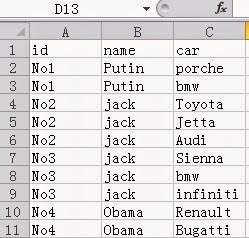
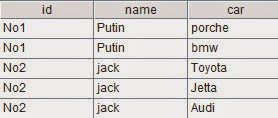
You need to export it as a CSV file with the following layout

esProc code

A1: Connect to MongoDB. Connection string format is mongo://ip:port/db?arg=value&…

A2: Retrieve data from MongoDB using find function and generate a cursor with the retrieved data. The collection name is test. There are no filtering criteria and all fields except _id are desired. find functions in esProc and MongoDB are alike. The esProc version follows MongoDB for syntax of filtering criteria.

A3: Retrieve desired fields to create a structured two-dimensional table, which is in the form of cursor. In the code, ~ represents every document in A2; conj function concatenates data together.

A4: Export data from A3 as a comma separated text file. @t means exporting with column names. esProc engine manages buffers automatically, fetching a batch of data each time from the cursor into the memory for computation.  

A4: Close MongoDB connection.

For users who want independent management of each batch of data, esProc provides the following approach

A3: Run a loop to fetch data from the cursor into memory, 1,000 rows each time. A3’s working range is the indented B3 and B4, in which A3 is used to reference the loop variable. A3’s data is as follows:

B3Convert the current batch of data to structured two-dimensional table, as shown below:

B4Append the result of processing the current batch to the file. @a means data appending. 

4/08/2015

esProc Finds Differences between CSV files

userName and date are the logical primary key of both old.csv file and new.csv file, in which we want to find rows that are new, deleted and updated.

The source data is as follows:

As can be seen from the above data, in new.csv the 2nd and the 3rd row are the new and the 4th row is the updated; in old.csv the 3rd row is the deleted.
esProc code

A1,B1Retrieve the comma-separated files.

A2,B2Sort data by the key, as this is required by the following merge function.

A3Find the new records by the key. merge function is used to merge data sets. @d means calculating the difference during the merge. Similar options include @u for union and @i for intersection. The computed result is as follows:

A4Find the deleted records by the key. The computed result is as follows:

A5Take the key fields as ordinary ones to find the updated records. The computed result is as follows:

A6A5 is an intermediate result. We need to calculate the difference between A5 and the new records to get the updated records. The computed result is as follows:
B6Return A6 to JAVA program or the reporting tool.

Now all data processing work has been finished. We’ll then integrate the esProc script into JAVA program via JDBC. The JAVA code is as follows:

  //establish a connection via esProc JDBC
  Class.forName("com.esproc.jdbc.InternalDriver");
  con= DriverManager.getConnection("jdbc:esproc:local://");
  //call esProc script, whose name is test and that can accept parameters
  st =(com.esproc.jdbc.InternalCStatement)con.prepareCall("call test()");
  ResultSet set = st.getResultSet();//get the result

If you want to return multiple data sets to the JAVA program, you can modify B6’s code into result new,delete,update

3/22/2015

esProc Handles Duplicated Records in CSV files


JAVA doesn’t have the class library for grouping data from a text file or getting distinct values, which results rather complicated coding. In dealing with the duplicated records in a CSV file, esProc can work with JAVA to make it easier. The following example will tell you how esProc works.


dup.csv contains 8 columns, in which there are some duplicated values, as shown below: 

We need to filter away the duplicated records, get the first 6 columns and rearrange the 7th and the 8th column, according to the rule that work phone will be made the 7th column and work email the 8th column for the new file, and if there is more than one work phone or work email for the same person, the first one will be used.

esProc approach

A1: Import the file separated by commas.

A2: Filter records to remove the duplicated ones and rearrange them. group function is used to group them. ~ represents each group of records; _1,_2…_8 are default column names; @1 indicates getting the first record from the query result. The result is as follows:

A3: Export the result to a new CSV file. Or we can use exportxls function to export data as the Excel format.

Having done all data processing, the esProc script will then be integrated with JAVA program via JDBC using the following JAVA code:

         // establish a connection via esProc JDBC
         Class.forName("com.esproc.jdbc.InternalDriver");
         con= DriverManager.getConnection("jdbc:esproc:local://");
         // call esProc script, whose name is test and which receives parameters
         st =(com.esproc.jdbc.InternalCStatement)con.prepareCall("call test()");
         st.execute();//execute esProc stored procedure
         ResultSet set = st.getResultSet();//get the result