Showing posts with label code example. Show all posts

6/02/2015

A Code Example of External Memory Grouping in esProc

In data analysis, we often need to group data and then compute the aggregate value for each group, or perform other computations on each group. esProc allows using groups function to compute aggregate values for groups of data, as well as grouping records of a table with group function for use in subsequent computations. However, external memory grouping is required when data being grouped is big and cannot be loaded to the memory in its entirety and thus the above-mentioned methods for data summarizing and grouping become useless.

A table with big data containing1,000,000 records is used to simulate call duration records of mobile phone users. It is stored in the binary file PhoneBill:

Mobile phone numbers used for the simulation are 8-digit integers whose first four digits are the fixed 1234 and the rest is randomly generated. The records start on a randomly generated day of August in 2014. Values of call duration are integers randomly generated with a 90 percent chance of being one minute. The maximum limit is 20 minutes. After the data file is prepared, B11 fetches the first 1,000 rows:
Perform the following computations based on the data in PhoneBill:
     Compute total call duration of all users and their average call duration in each day of August.
     Compute every user’s total call duration in August.
     Store each day’s call records in a file.
     Find the numbers of five users who make the longest call in total for each day of August.

To solve the first problem, data needs to be grouped and summarized by DateTime. As there are only 31 days in the month of August, the result set won’t contain big data and the aggregate operation can be performed in the memory:

A2 generates a cursor for the binary text data in A1. A3 groups and summarizes data from the cursor. The result is as follows:

Since there is not so much data in the result, the cursor data only needs to be traversed once. Here groups function is adequate to perform the group and aggregate operation and external memory grouping is not necessary. In fact the result set can be directly acquired without the cursor, thanks to the reasonable amount of data. For more related information, please see esProc External Memory Computing: Principle of Grouping. To compute the average call duration in a day, we need to first get the total call duration and the total number of calls in this day. The result of A4 is as follows:

It is a different case for the second task. As the number of users is far more than the number of days in August, we should consider if the result of data grouping and summarizing can be returned to the memory all at once. There are 10,000 users at most in this example, which, actually, is not a large number. It is merely used to illustrate the computation of big result set. Here we suppose the memory can only hold 1,000 records:
groupn function is needed to handle the grouping and summarizing of big data. The function fetches data from cursor and performs group operation in batches according to the pre-specified number of buffer rows, using the external memory. By Phone and according to the specified 1,000 buffer rows, A3 groups and aggregates cursor data, computing the total call duration in the month. The result of grouping and summarizing big data is still a cursor. Fetching data from it is no different to fetching data from any other cursor. The result of A3 is as follows:

A4 fetches the records of the first 1,000 users. Their total call duration is as follows:

By the way, if data in the cursor hasn’t been entirely fetched, cs.close() function needs to be called to clean the temporary files from the external memory in time.

The third task requires grouping data by the DateTime first before storing data of each day in a file:

Different from other grouping operations on big data, groupn function requires specifying group numbers directly in the grouping expression. In A3, the dates in DateTime are used as the group numbers. Different from the previous result of data grouping and summarizing, A3’s function returns a sequence of cursors. Each cursor corresponds to a group:

The fourth and fifth lines of code store cursor data in each day in a file. A6 selects four days’ data, and A7 fetches the first 1,000 records from it:

For the fourth problem, group data by DateTime, and then group and summarize data of each group. Finally, select the desired mobile phone numbers from the aggregate results:

A3 directly specifies dates of DateTime as group numbers in the grouping expression, and returns a sequence of cursors:

The code from the fourth to sixth line loops through cursor data of each group to compute the total call duration per user per day, and according to the aggregate result, finds records of users whose call duration is in the top five. Please note that when aggregate function topx is used to sort data in descending order, just add a negative sign before the sorting expression, like –TotalDuration in B5. Select data of five numbers that have made the longest call and store it in the table sequence in B3. After loops are finished, the final result can be viewed in B3 as follows:

An alternative choice is to use the files generated from handling the third problem, instead of grouping all the original data. 

5/05/2015

esProc Improves Text Processing – Remove Duplicate Rows

During processing the text file, sometimes we need to remove duplicate rows from the grouped data. But the operation becomes complicated when the file under processing is too big to be entirely loaded into the memory. esProc’s group operation supports importing a whole group of data with the file cursor, as well as many options. So it can handle this kind of operation effortlessly. The following example will show you how it works.

The file EPRom.log has four columns separated by tab and its data have been grouped by the second column. Duplicate rows need to be removed (only the first row of each group is wanted). Some of the source data are as follows:


esProc code for doing this

A1=file("E:\\EPRom.log").import()

This line of code imports the file into the memory. By default, the separator is tab and column names are _1_2_3……. If it is a CSV file, the separator needs to be specified using the code import(;”,”). If the file’s first row contains column names, @t option can be used to import them, that is, import@t(). The result of A1 is as follows:

A2=A1.group@1o(_2)

This line of code gets the first row from every group. The group field is _2, the second field. This is the case’s final result, as shown below.

By default, group function will regroup the data. For instance, A1.group(_2) will divide A1 into two groups by the second field, as the following shows:

But the use of @o option won’t make that happen. For instance, result of A1.group@o(_2) is as follows:

With @1 option, the function will get the first row of every group. By using both @1 and @o, we’ve hit the target of this case.
        
In the situation that the file is too big to be wholly loaded into the memory, esProc cursor can be used to deal with it. Corresponding code is as follows:

A1=file("E:\\EPRom.log").cursor()

This line of code opens the log file in the form of cursor. cursor function returns a cursor object according to the corresponding file object, with tab being the separator and _1,_2…_n being column names by default. Notice that the code merely creates the cursor object without importing data. Data importing will be started by for statement or fetch function.

B1= file("e:\\result.txt")

This line of code creates a file object to which the computed results can be exported later on.

A2:for A1;_2

This line of code imports data from cursor A1 by loop. Each time it imports a group of data with the same second column (column name is _2). In this step the data are truly being imported into the memory.
Here for statement deserves special attention. In esProc, for cs,n imports n records from cursor cs each time. for cs;x imports a group of records with the same x field from cursor cs each time, the condition is that records have been grouped by x field.

The x in for cs;x statement can be an expression, which means multiple rows will be imported until the result of computing expression x changes. Take for A1 ; floor(_1/5) as an example. It divides _1 field by 5 and rounds the result off, put the records with the same results into the same group, like the first row to the fifth row.

B2=file("e:\\result.txt").export@a([A2(1)])

As the loop body of for statement in A2, it processes every group of data in the same way. The method is to get the first row of the current group and append it to file result.txt. A2 is the loop variable which represents all records in the current group. A2(1) represents the first record in 2. export function is used to write the structured data into a new file, its @a option means appending. Since A2(1) is a single record, it needs to be converted into array with the operator [].

We can see the final result in result.txt:

In esProc, the working range of for statement can be represented by indentation instead of the parentheses or identifiers like begin/end. In the following code block, for instance, B2-B5 is A2’s working range.

esProc Finds Differences between CSV files

userName and date are the logical primary key of both old.csv file and new.csv file, in which we want to find rows that are new, deleted and updated.


The source data is as follows:

As can be seen from the above data, in new.csv the 2nd and the 3rd row are the new and the 4th row is the updated; in old.csv the 3rd row is the deleted.
esProc code

A1,B1Retrieve the comma-separated files.

A2,B2Sort data by the key, as this is required by the following merge function.

A3Find the new records by the key. merge function is used to merge data sets. @d means calculating the difference during the merge. Similar options include @u for union and @i for intersection. The computed result is as follows:

A4Find the deleted records by the key. The computed result is as follows:

A5Take the key fields as ordinary ones to find the updated records. The computed result is as follows:


5/03/2015

Query List Fields in MongoDB Subdocuments in esProc

Problem source

https://groups.google.com/forum/#!msg/mongodb-user/HqzXSh5DZek/ffZG0TQ1w8cJ . 

Collection Cbetween contains cascaded subdocuments, in which the List-type dataList field includes a series of strings, each of which has multiple numbers. You need to find strings according to the criterion that the first number is greater than 6154 and less than or equal to 6155.


Below is one of Cbetween’s subdocuments:

{
        "_id" : ObjectId("54f6a766bf4436333edcd6a2"),
        "_class" : "com.abc.core.bo.obj.Objs",
        "objList" : [
                {
                        "name" : "ABB-09",
                        "uid" : "ABB-09",
                        "data" : {
                                "dataId" : NumberLong(0),
                                "dataList" : [
            "6150,32.9,1.475,,1.434",
            "6150.5,43,,1.529,1.402",
            "6151,31.8,1.506,1.447,1.453",
            "6151.5,33.6,1.481,1.456,1.521",
            "6152,30.9,1.465,1.472,1.547",
            "6152.5,39.5,1.404,1.425,1.485",
            "6153,43.2,1.406,1.446,1.481",
            "6153.5,39.5,1.433,1.468,1.488",
            "6154,32.7,1.459,1.477,1.427",
            "6154.5,37.9,1.529,1.429,1.429",
            "6155,30.4,1.505,1.532,1.543",
            "6155.5,37.3,1.49,1.436,1.462",
            "6156,35.3,1.538,1.45,1.488",
            "6156.5,37.3,1.517,1.535,1.473",
            "6157,32.7,1.401,1.405,1.497",
            "6157.5,38.9,1.488,1.468,1.499",
            "6158,35.4,1.526,1.422,1.452",
            "6158.5,43.3,1.516,1.433,1.491",
            "6159,34.6,1.519,1.442,1.478",
            "6159.5,42.7,1.426,1.514,1.428",
      "6160,32.7,1.451,1.5,1.516"
            ]
           }
          }
         ]
 }

The eligible strings include "6154.5,37.9,1.529,1.429,1.429","6155,30.4,1.505,1.532,1.543".
esProc code


A1: Connect to MongoDB. The connection string format is mongo://ip:port/db?arg=value&…

A2: Retrieve data from MongoDB using find function and create a cursor. The name of the collection is Cbettwen. There is no filtering criterion. Retrieve all fields except _id field. Syntax of filtering criterion in esProc find function, which is similar to its MongoDB counterpart, follows MongoDB rules. 

A3: Find the eligible strings. conj function concatenates results of filtering each subdocument in A2; ~ represents each member of an upper level of table sequence. new function is used to create a new table sequence and #1 represents the first field of the table sequence. array function can split a string into a sequence with comma being default delimiter; @1 means splitting the string into two members with the first delimiter being the boundary.

A4: Fetch cursor data in batches to get data from the memory. The result is as follows:

A5Disconnect from MongoDB.

4/24/2015

esProc Exports Unstructured MongoDB Data as CSV Files


MongoDB allows storing unstructured data in it. But it is somewhat difficult to export the data as standard structured data. esProc, however, makes it an easy job, with MongoDB’s cooperation. Let’s look at the steps for doing this.

Below is some data from Collection test
/* 0 */
{
  "_id" : ObjectId("5518f6f8a82a704fe4216a43"),
  "id" : "No1",
  "cars" : {
    "name" : "Putin",
    "car" : ["porche", "bmw"]
  }
}

/* 1 */
{
  "_id" : ObjectId("5518f745a82a704fe4216a44"),
  "id" : "No2",
  "cars" : {
    "name" : "jack",
    "car" : ["Toyota", "Jetta", "Audi"]
  }
} 

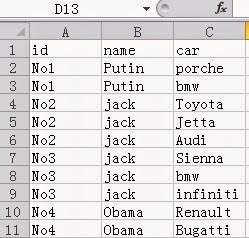
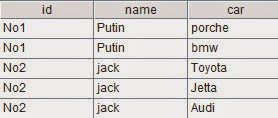
You need to export it as a CSV file with the following layout

esProc code

A1: Connect to MongoDB. Connection string format is mongo://ip:port/db?arg=value&…

A2: Retrieve data from MongoDB using find function and generate a cursor with the retrieved data. The collection name is test. There are no filtering criteria and all fields except _id are desired. find functions in esProc and MongoDB are alike. The esProc version follows MongoDB for syntax of filtering criteria.

A3: Retrieve desired fields to create a structured two-dimensional table, which is in the form of cursor. In the code, ~ represents every document in A2; conj function concatenates data together.

A4: Export data from A3 as a comma separated text file. @t means exporting with column names. esProc engine manages buffers automatically, fetching a batch of data each time from the cursor into the memory for computation.  

A4: Close MongoDB connection.

For users who want independent management of each batch of data, esProc provides the following approach

A3: Run a loop to fetch data from the cursor into memory, 1,000 rows each time. A3’s working range is the indented B3 and B4, in which A3 is used to reference the loop variable. A3’s data is as follows:

B3Convert the current batch of data to structured two-dimensional table, as shown below:

B4Append the result of processing the current batch to the file. @a means data appending. 

4/21/2015

Generate a Result Set with Dyamic Columns with esProc


Below is a selection from the original table (tb1):
Prjno      Subtask   Ddate      Num
P9996     P9996-sub002 2015-01-01     123
P9996     P9996-sub002 2015-01-02     134
P9996     P9996-sub002 2015-01-03     345
P9996     P9996-sub002 2015-01-04     55
T0071     T-007-01 2015-01-01     3333
T0071     T-007-01 2015-01-02     356
T0071     T-007-01 2015-01-03     178

According to a specified date, you need to get all projects before this date in the same month. Suppose the input date is 2015-01-03, you’ll get this:
Prjno     Subtask  2015-01-01     2015-01-02     2015-01-03
P9996     P9996-sub002 123  134  345
T0071     T-007-01 3333       356  178


esProc code for doing this:

A1: Query data from the beginning of the month to the specified date. d_date is an input date parameter, like 2015-01-03. pdate@m(d_date) calculates the first date of the current month.

A2: Create an empty result table sequence with dynamic columns according to the sequence of dates from the first date of the month to the specified date:

A3: The first part A1.group(Prjno,Subtask) groups A1’s data by Prjno and Subtask (esProc data grouping will keep the detail data of each group), then ~.groups(Ddate;sum(Num):Num), one by by, groups each group of data by the date and aggregate Num valules; finally, A2.record() writes each group name and the aggregate value into A2’s result table sequence. The following is the final result:

In a similar way any database is called, esProc can be called by the reporting tool or a JAVA program. The computed result in the form of ResultSet can be returned to JAVA main program via esProc JDBC. You can see related documents for detailed method. 

4/20/2015

Query List Fields in MongoDB Subdocuments in esProc

Problem source: https://groups.google.com/forum/#!msg/mongodb-user/HqzXSh5DZek/ffZG0TQ1w8cJ .

Collection Cbetween contains cascaded subdocuments, in which the List-type dataList field includes a series of strings, each of which has multiple numbers. You need to find strings according to the criterion that the first number is greater than 6154 and less than or equal to 6155. Below is one of Cbetween’s subdocuments:

The eligible strings include "6154.5,37.9,1.529,1.429,1.429","6155,30.4,1.505,1.532,1.543".
esProc code

A1: Connect to MongoDB. The connection string format is mongo://ip:port/db?arg=value&…

A2: Retrieve data from MongoDB using find function and create a cursor. The name of the collection is Cbettwen. There is no filtering criterion. Retrieve all fields except _id field. Syntax of filtering criterion in esProc find function, which is similar to its MongoDB counterpart, follows MongoDB rules. 

A3: Find the eligible strings. conj function concatenates results of filtering each subdocument in A2; ~ represents each member of an upper level of table sequence. new function is used to create a new table sequence and #1 represents the first field of the table sequence. array function can split a string into a sequence with comma being default delimiter; @1 means splitting the string into two members with the first delimiter being the boundary.

A4: Fetch cursor data in batches to get data from the memory. The result is as follows:

A5Disconnect from MongoDB.

4/15/2015

Combine Text Files Conditionally with esProc


There are multiple text files in a single directory which need to be combined according to specified conditions. The text files include, for example, 12345.txt, 12346.txt, 12347.txt, 2013070312345.txt, 2013070312346.txt, 2013070312347.txt and 2013070412347.txt. The combination result is shown by the following figure:


That is, you need to combine files with the same last five numbers together.

Usually file handling in high-level languages is much too low-level, generating bloated code for this computation with a series of loop and if statements. In contrast, esProc can make the computation quite easy by providing deep encapsulation and effectively supporting set operations. esProc script is as follows:

In which,

A1: List all files under E:\\test directory, and find those whose name length is greater than 5.

A2: Run a loop to handle files in A1.

B2: Import a file and append it, through B3, to a text file named after the file’s last five numbers.

In the above script, a single file is loaded into memory in one go because it contains small volume of data (within memory capacity). For a file containing big data that cannot be entirely loaded into memory, esProc provides the approach of stream-style processing of file cursor to handle it. With this approach, file data can be imported and exported in batches. The above script can be modified to accommodate itself to a big file:

B2 creates a file cursor, in which @s means importing the file as a table sequence comprising one-field strings, and exports the content. The cursor is then closed in B4.