Showing posts with label mongodb. Show all posts

5/03/2015

Query List Fields in MongoDB Subdocuments in esProc

Problem source

https://groups.google.com/forum/#!msg/mongodb-user/HqzXSh5DZek/ffZG0TQ1w8cJ . 

Collection Cbetween contains cascaded subdocuments, in which the List-type dataList field includes a series of strings, each of which has multiple numbers. You need to find strings according to the criterion that the first number is greater than 6154 and less than or equal to 6155.


Below is one of Cbetween’s subdocuments:

{
        "_id" : ObjectId("54f6a766bf4436333edcd6a2"),
        "_class" : "com.abc.core.bo.obj.Objs",
        "objList" : [
                {
                        "name" : "ABB-09",
                        "uid" : "ABB-09",
                        "data" : {
                                "dataId" : NumberLong(0),
                                "dataList" : [
            "6150,32.9,1.475,,1.434",
            "6150.5,43,,1.529,1.402",
            "6151,31.8,1.506,1.447,1.453",
            "6151.5,33.6,1.481,1.456,1.521",
            "6152,30.9,1.465,1.472,1.547",
            "6152.5,39.5,1.404,1.425,1.485",
            "6153,43.2,1.406,1.446,1.481",
            "6153.5,39.5,1.433,1.468,1.488",
            "6154,32.7,1.459,1.477,1.427",
            "6154.5,37.9,1.529,1.429,1.429",
            "6155,30.4,1.505,1.532,1.543",
            "6155.5,37.3,1.49,1.436,1.462",
            "6156,35.3,1.538,1.45,1.488",
            "6156.5,37.3,1.517,1.535,1.473",
            "6157,32.7,1.401,1.405,1.497",
            "6157.5,38.9,1.488,1.468,1.499",
            "6158,35.4,1.526,1.422,1.452",
            "6158.5,43.3,1.516,1.433,1.491",
            "6159,34.6,1.519,1.442,1.478",
            "6159.5,42.7,1.426,1.514,1.428",
      "6160,32.7,1.451,1.5,1.516"
            ]
           }
          }
         ]
 }

The eligible strings include "6154.5,37.9,1.529,1.429,1.429","6155,30.4,1.505,1.532,1.543".
esProc code


A1: Connect to MongoDB. The connection string format is mongo://ip:port/db?arg=value&…

A2: Retrieve data from MongoDB using find function and create a cursor. The name of the collection is Cbettwen. There is no filtering criterion. Retrieve all fields except _id field. Syntax of filtering criterion in esProc find function, which is similar to its MongoDB counterpart, follows MongoDB rules. 

A3: Find the eligible strings. conj function concatenates results of filtering each subdocument in A2; ~ represents each member of an upper level of table sequence. new function is used to create a new table sequence and #1 represents the first field of the table sequence. array function can split a string into a sequence with comma being default delimiter; @1 means splitting the string into two members with the first delimiter being the boundary.

A4: Fetch cursor data in batches to get data from the memory. The result is as follows:

A5Disconnect from MongoDB.

4/28/2015

Join MongoDB Collections with esProc

Problem source: http://stackoverflow.com/questions/29396985/is-there-a-where-like-relation-function-when-using-pymongo

It is difficult to join MongoDB collections through hardcoding as it doesn’t directly support joins. Yet you can use esProc to perform inner join, left join and full join between collections or join the documents. Here is an example.

Logically, the two collections - categories and rules – have a referenced and referencing relationship through the key field cat. They need to be joined using left join to retrieve title, regex, cat field from categories and path field from rules. Below is a part of the original data:


esProc code:


A1: Connect to MongoDB. The connection string format is mongo://ip:port/db?arg=value&…

A2, B2: Retrieve data from MongoDB using find function, sort it and create a cursor. A2’s cursor contains data from the left table that requires sorting by cat. In esProc find function, which is analogous to the combination of MongoDB find, sort and limit function, the filtering criterion syntax follows the MongoDB rules.

A3: Perform left join through the key field cat. @x means joining the two cursors. @1 means performing left join. The two options can work together.

A4: Retrieve desired field from A3. _1 and _2 respectively represent the two cursors under joining.

A5: Fetch data from the cursor as follows:

One point to note is that if A4 produces too much data to be loaded into memory, you can use export function to write it into a file.

A6: Close MongoDB connection. 


4/27/2015

Group MongoDB Collection and Find Top N members in esProc


Collection last3 has two fields: variable and timestamp. You need to first group documents by variable and find from each group the top 3 ones with the latest timestamp, and then find from the three documents the one with the earliest timestamp.


Below is the selection from last3

esProc code

A1: Connect to MongoDB. The connection string format is mongo://ip:port/db?arg=value&…

A2: Use find function to retrieve data from MongoDB, sort it and create a cursor. last3 is the collection name; no filtering criterion is specified; and all fields except _id will be retrieved and sorted by variable. In esProc find function, which is analogous to the combination of MongoDB find, sort and limit function, the filtering criterion syntax follows the MongoDB rules.

A3: Fetch data from the cursor by loop, getting a group of documents with the same variable field each time. A3’s working range is the indented B3 to B4, where A3 can be used to reference the loop variable. A3’s result is in-memory data. The following is one of the results of data fetching:

B3: Find from the current group of documents the three ones with the latest timestamp.

B4: Append each of B3’s loop results to B2. The result of B2 is as follows:

A5Find the document with the earliest timestamp from B2. It is as follows:

A6Close MongoDB connection.

4/26/2015

esProc Implements Foreign Key Relationship for MongoDB Collections


With MongoDB’s built-in API, you implement a foreign key relationship through hardcoding. The hardcode is not intuitive and difficult to write. In this case you can use esProc to handle this. For example:


Collection UserCourseProgres records the relationship between users and courses. Its courseid is the foreign key that points to _id field in Collection Course. You need to find the number of users who study each course. Course names use title field in Course.


esProc code

A1: Connect to MongoDB. The connection string format is mongo://ip:port/db?arg=value&…

A2: Compute the number of people who study each course. Here aggregate function is used to retrieve data from MongoDB. This function derives from MongoDB. Its first parameter is collection name and the second one is the aggregate expression whose syntax follows MongoDB rules. A2’s result is in-memory data, as shown below:

A3: Find course names from Course. find function is used here to retrieve data from MongoDB. This function derives from MongoDB. Its second parameter is the filtering criterion whose syntax follows MongoDB rules. The function returns a cursor. Since there are only a few courses, fetch function is used to fetch cursor data into memory. The result is as follows:

A4: Switch A3’s foreign key values into corresponding records in A2. The result is:

A5Access in-memory data using object and create a new two-dimensional table as follows:

A6Disconnect from MongoDB. 
4/23/2015

Merge MongoDB Document in esProc


Below is a selection of Collection C1

{
       "_id" : ObjectId("55014006e4b0333c9531043e"),
       "acls" : {
              "append" : {
                     "users" : [ObjectId("54f5bfb0336a15084785c393") ],
                     "groups" : [ ]
              },
              "edit" : {
                     "groups" : [ ],
                     "users" : [
                            ObjectId("54f5bfb0336a15084785c392")
                     ]
              },
              "fullControl" : {
                     "users" : [ ],
                     "groups" : [ ]
              },
              "read" : {
                     "users" : [ ObjectId("54f5bfb0336a15084785c392"), ObjectId("54f5bfb0336a15084785c398")],
                     "groups" : [ ]
              }
       },
        name: "ABC"
}

{
       "_id" : ObjectId("55014006e4b0333c9531043f"),
       "acls" : {
              "append" : {
                     "users" : [ObjectId("54f5bfb0336a15084785c365") ],
                     "groups" : [ ]
              },
              "edit" : {
                     "groups" : [ ],
                     "users" : [
                            ObjectId("54f5bfb0336a15084785c392")
                     ]
              },
              "fullControl" : {
                     "users" : [ ],
                     "groups" : [ ]
              },
              "read" : {
                     "users" : [ ObjectId("54f5bfb0336a15084785c392"), ObjectId("54f5bfb0336a15084785c370")],
                     "groups" : [ ]
              }
       },
        name: "ABC"
}


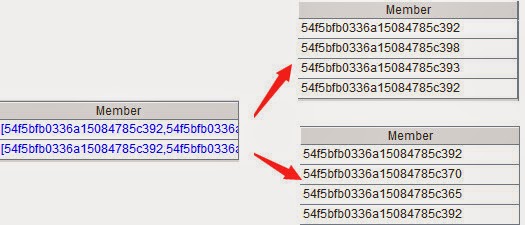
You need to group the collection by name. Each group contains the users field of the document corresponding to a same name and does not allow duplicate members. The expected result may like this:

{
  result : [
     {
          _id: "ABC",
          readUsers : [
                  ObjectId("54f5bfb0336a15084785c393"),
                  ObjectId("54f5bfb0336a15084785c392"),
                  ObjectId("54f5bfb0336a15084785c398"),
                  ObjectId("54f5bfb0336a15084785c365"),
                  ObjectId("54f5bfb0336a15084785c370")
           ]
      }
  ]
}


esProc code


A1: Connect to MongoDB. The connection string format is mongo://ip:port/db?arg=value&…

A2: Use find function to retrieve data from MongoDB, sort it and create a cursor. c1 is the collection name; no filtering criterion is specified; and all fields except _id will be retrieved and sorted by name. In esProc find function, which is analogous to the combination of MongoDB find, sort and limit function, the filtering criterion syntax follows the MongoDB rules.

A3: Fetch data from the cursor by loop, getting a group of documents with the same name field each time. A3’s working range is the indented B3 to B5, where A3 can be used to reference the loop variable.

B3: Retrieve all users fields from the current group of documents, as shown below:

B4: Merge users fields from all documents of the current group and remove duplicate members.

B5: Append each result of B4’s loop to B2. Finally B2 becomes this: 

B2 is the final result we want. If the result is too big to be loaded into the memory, you can use export@j function in B5 to convert each of B4’s results to a JSON string and then append them to the text file one by one.

A6: Disconnect from MongoDB. 

4/20/2015

Query List Fields in MongoDB Subdocuments in esProc

Problem source: https://groups.google.com/forum/#!msg/mongodb-user/HqzXSh5DZek/ffZG0TQ1w8cJ .

Collection Cbetween contains cascaded subdocuments, in which the List-type dataList field includes a series of strings, each of which has multiple numbers. You need to find strings according to the criterion that the first number is greater than 6154 and less than or equal to 6155. Below is one of Cbetween’s subdocuments:

The eligible strings include "6154.5,37.9,1.529,1.429,1.429","6155,30.4,1.505,1.532,1.543".
esProc code

A1: Connect to MongoDB. The connection string format is mongo://ip:port/db?arg=value&…

A2: Retrieve data from MongoDB using find function and create a cursor. The name of the collection is Cbettwen. There is no filtering criterion. Retrieve all fields except _id field. Syntax of filtering criterion in esProc find function, which is similar to its MongoDB counterpart, follows MongoDB rules. 

A3: Find the eligible strings. conj function concatenates results of filtering each subdocument in A2; ~ represents each member of an upper level of table sequence. new function is used to create a new table sequence and #1 represents the first field of the table sequence. array function can split a string into a sequence with comma being default delimiter; @1 means splitting the string into two members with the first delimiter being the boundary.

A4: Fetch cursor data in batches to get data from the memory. The result is as follows:

A5Disconnect from MongoDB.

1/21/2015

esProc Assists Report Development – JOIN Operation in MongoDB

Heterogeneous datasources are frequently needed in report development, but they are difficult to realize using the reporting tool, like JasperReport, alone. To present the result of joining two MongoDB collections together, for instance. Though JasperReport has the functions of virtual data source or table join, but they are offered only in the commercial or higher versions and probably won’t appear in free version. Moreover, these two functions support connection to only two datasources. If users need more, the program development becomes complicated. Additionally, they don’t support subsequent structured data computing of the joined data as SQL does, due to providing only a graphical interface.

esProc has a powerful structured data computing engine, supports heterogeneous datasources and is easy to be integrated, thus it is useful for assisting the reporting tool to realize MongoDB join conveniently. The following example will show you how esProc works to create a join in MongoDB.

There are two collections – sales and emp – in MongoDB. Logically, sale’s SellerId field is equivalent to a foreign key that points to emp’s EId field. The task is to query orders in sales by the time range, create a left join with emp and present the result in the report. Some of the source data are as follows:


Collection sales

Collection emp 

esProc script for completing the task: 

A1=MongoDB("mongo://localhost:27017/test?user=root&password=sa")
This line of code establishes the connection to MongoDB. User name and password can be specified through the two parameters user and password.

As connecting to an ordinary database, esProc also supports connecting to MongoDB through JDBC. But since the third-party JDBC is not free, and has a weaker function than the official library function – for example, it cannot retrieve the multilayer data, esProc will directly encapsulate the native methods, thereby retaining the function and syntax of MongoDB. find function, for example, can be used in this case.

A2=A1.find("sales","{'$and':[{'OrderDate':{'$gte':'"+string(begin)+"'}},{'OrderDate':{'$lte':'"+string(end)+"'}}]}","{_id:0}").fetch()

This line of code finds records during a certain time period from MongoDB’s collection sales. find function’s first parameter is the collection’s name, its second parameter is the query condition that is defined according to MongoDB syntax and the third one specifies the field to be returned. Note that begin and end in the query condition are external parameters passed from the report, respectively representing the beginning date and the ending date of OrderDate.
find function will return a cursor, which means it doesn’t retrieve data into the memory entirely and thus supports processing big data. Data of the result cursor can be further processed with functions like skip, sort and conj and data retrieval won’t start until either fetch function or groups function, or for statement appears. fetch() function is used in this example to fetch the data into the memory. Suppose the time period is from 2009-01-01 to 2009-12-31, result of A2 is as follows: 

A3=A1.find("emp",,"{_id:0}").fetch()

This line of code retrieves all data, except for _id field, from collection emp unconditionally. Result is as follows: 

A4=A1.close()

This line of code closes the connection to MongoDB established in A1.

A5=join@1(A2:sales,SellerId;A3:emp,EId)

This line of code creates a left join between A2 and A3. The fields to join them together are A2’s SellerId and A3’s EId. Intuitively, two parts of the joined data are respectively named sales and emp. join function is used to perform the join operation, in which @1 option means left join. The result can be seen in the left part of the following figure: 

It can be seen that some of the SellerId in sales cannot find corresponding records in emp because of the left join. We can use @f to perform a full join; without any option, the function will perform an inner join.

A6=A5.new(sales.OrderID:OrderID,sales.Client:Client,sales.Amount:Amount,sales.OrderDate:OrderDate,emp.Name:Name,emp.Dept:Dept,emp.Gender:Gender)

A5 joins the data together. A6 gets the fields we want from the result of joining and creates a two-dimensional table using new function. For example, sales.OrderID:OrderID means getting sales.OrderID field from A5 and rename it OrderID (because reporting tools cannot identify field names like sales.OrderID). Result is as follows: 

Now all data are ready for creating the report. The final step is to return A6’s two-dimensional table to the reporting tool with result A6. esProc offers JDBC interface to be integrated with the reporting tool, and the latter will identify it as the ordinary database. Please refer to related documents for the integration solution.

Then design the report using JasperReport, for instance. The appearance and layout is as follows: 

Define two parameters – Pbegin and Pend – in the report according to the corresponding esProc parameters. Click Preview to see the report: 

The way the reporting tool calls the esProc script is the same as that it calls the stored procedure. Save the esProc script as, say, mongodbJoin.dfx to be called by mongodbJoin $P{pbegin},$P{pend} in JasperReport’s SQL designer. 

1/20/2015

esProc Assists Report Development – JOINs across MongoDB and MySQL

It is difficult to handle operations involving heterogeneous or multiple datasources, such as joins across MongoDB and MySQL, using the reporting tool, like Jasper Report, alone. Indeed Jasper Report and BIRT have the virtual data source or the table join and other functions to deal with them, but the functions are only provided in commercial or higher versions – because it’s hard to be provided for free – and have limited ability. They don’t support subsequent structured data computing on the joined data as SQL does.

esProc has a powerful structured data computing engine, supports heterogeneous datasources and is easy to be integrated. It is useful in assisting the reporting tool to realize joins across MongoDB and MySQL conveniently. Learn how esProc operates through the following example.

emp1 is a collection in MongoDB and cities is a table in MySQL. emp1’s CityID field, equivalent to a foreign key logically, points to cities’s CityID field. CityID and CityName are two fields of cities. What we want is to select employees from emp1 according to a specified time interval and switch its CityID to CityName. Some of the source data are as follows:


Collection emp1

Table cities

esProc script:

A1=MongoDB("mongo://localhost:27017/test?user=root&password=sa")

This line of code establishes the connection to MongoDB, in which user and password are parameters for specifying the user name and the password.
esProc supports to connect to MongoDB through JDBC as it does to connect to an ordinary database. But because the third-party JDBC is not as powerful as the official library function – for example, it cannot retrieve multilayer data, esProc encapsulates native methods directly, to retain MongoDB’s functions and syntax. Thus find function can be used.

A2=A1.find("emp1","{'$and':[{'Birthday':{'$gte':'"+string(begin)+"'}},{'Birthday':{'$lte':'"+string(end)+"'}}]}","{_id:0}").fetch()

This line of code retrieves records during a certain time interval from collection emp1 in MongoDB. find function’s first parameter is the collection name, its second parameter is the query condition that is defined according to syntax of MongoDB, and its third one is the specified field to be returned. Query condition’s two parameters- begin and end – are external parameters passed from the reporting tool, specifying respectively the beginning time and the ending time for Birthday.


find function returns a cursor. That means it won’t load all data into the memory at once and thus supports big data processing. The result cursor can be further processed by functions such as skip, sort, conj and etc. And data won’t be fetched until fetch function, groups function or for statement come into play. Suppose the time interval is from 1976-01-01 to 1988-12-31, then result of A2 is this:

A3=A1.close()

This line of code is used to close the connection to MongoDB established in A1.

A4=myDB1.query("select * from cities")

This line of code executes an SQL statement for retrieving data from MySQL, in which myDB1 is the datasource name. The configuration interface is as follows:

It can be seen that the connection to the datasource is established through JDBC, which supports any database. In this way, the connection can be established and close either automatically or manually. Connection to MongoDB uses the latter way while this case adopts the former.

query function makes query through an SQL statement. Result is as follows:

A5=A2.switch(CityID,A4)

This line of code replaces A2’s CityID field with A4’s corresponding records, with an effect similar to the left join. After the switching, A2 becomes like this (both A2 and A5 points to the same two-dimensional table):

Click the blue hyperlink in CityID to see records in detail:

Sometimes if an inner join is needed, use @i option in switch function. Then the code will be A2.switch@i(CityID,A4) and the result is as follows:

A6=A5.new(EID,Dept,CityID.CityName:CityName,Name,Gender)

A5 establishes a relation between the collection and the table, while A6 retrieves from the result data the fields we want and creates a two-dimensional table using new function. CityID.CityName:CityName means retrieving CityName field corresponding to CityID field from A5 and renaming it CityName (for the reporting tool cannot identify field names like CityID.CityName).

As can be seen from the above code, after fields are switched by switch function, the database relation can be represented through object type access. This is simple and more intuitive, especially when establishing the multi-table and multilayer relation.

Result of A6 is as follows:

That is all the data needed for creating the report. The final step is to return A6’s two-dimensional table to the reporting tool using result A6. esProc offers JDBC interface to be integrated with the reporting tool and the latter will identify it as a database. Learn more about the integration solution in related documents.

Then design the report with, for instance, JasperReport. The appearance and layout is as follows:

Define two parameters – Pbegin and Pend – corresponding to the two esProc parameters in the report. Click Preview to see the report: