Showing posts with label cross database. Show all posts

3/15/2015

esProc Performs Dynamic Cross-database MERGE Operation

The MERGE statement provided by databases like MSSQL and ORACLE is very convenient for updating tables. But it is not as convenient as it is expected to be when the source table and target table exist in different databases. In this case esProc is able to rise to the occasion and assists the operation.


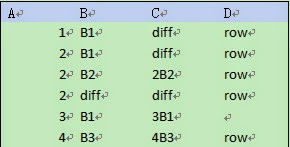
source and target are parameters representing two tables of the same structure but of different data in two databases. The source table will be used to update the target table based on their primary keys. For example, both Table 1 and Table 2 (as shown below) have a primary key consisting of column A and column B:

After Table 1 is updated by Table 2, it will be as follows:
esProc code

A1,A2Get the source table’s primary key from the system tables and store it in variable pks; the result is “A,B”. Databases vary in how to get the primary key. Here MSSQL will be used as an example. myDB2/myDB1 represents the database where source/target resides.

A3,A4Retrieve data from source and target as cursors; sort data according to the merging field (the primary key) for the subsequent MERGE operation.

A5Perform a left-join with target and source. @x represents cursor-handling and @1 represents the left-join. The macro ${columns} is used to convert a string to an expression.

A6Fetch data from A5’s cursor by loop, 1,000 rows each time. A6 is used in the loop body B6-B9 to reference the loop variable. Below is the structure of the operation performed in A6:

B6,B7Select rows need to be inserted and modify the target. @i option means performing only the INSERT, without scanning the whole table.  
B8,B9Select rows for updating the table and modify the target. @u means performing only the UPDATE. array function gets a list of the field names.

When the loop is over, target (Table 1) has been modified as follows:
The above approach also applies to databases that don’t support the MERGE statement, like MySQL. 

11/25/2014

esProc Helps Process Heterogeneous Data Sources in Java –Cross-Database Relating

JoinRowSet and FilteredRowSet provided by RowSet– Java's class library for data computing – can perform cross-database related computing, but they have a lot of weaknesses. First, JoinRowSet only supports inner join, it doesn't support outer join. Second, test shows that db2, mysql and hsql can work with JoinRowSet, yet the result set of join oracle11g to other databases is empty though no error reporting will appear. The fact is there were two users who perform cross-database join using oracle11g database even got the correct result. This suggests that JDBC produced by different database providers will probably affect the result obtained by using this method. Last, the code is complicated.

esProc has proved its ability in assisting Java to perform cross-database relating. It can work with various databases, such as oracle, db2, mysql, sqlserver, sybase and postgresql, to perform a variety of cross-database related computing, like inner join and outer join involving heterogeneous data. An example will teach you the way esProc works. Requirement: relate table sales in db2 to table employee in mysql through sale.sellerid and employee.eid, and then filter data in both sales and employee according to the criterion state="California". The way the code is written in this task applies to situations where other types of databases are involved.


The structure and data of table sales are as follows: 

The structure and data of table employee are as follows:

Implementation approach: Call esProc script using Java program, join the multiple databases together to realize the cross-database relating, perform filtering and return the result to Java in the form of ResultSet.

The code written in esProc is as follows:

A1Connect to the data source db2 configured in advance.

A2Connect to the data source mysql configured in advance. In fact oracle and other types of databases can be used too.

A3, A4Retrieve table sequences: sales and employee, from db2 and mysql respectively. esProc's Integration Development Environment (IDE) can display the retrieved data visually, as shown in the right part of the figure in the above.

A5Relate sales to employee through sellerid=eid using esProc's object reference mechanism.

A6Filter the two table sequences according to state="California".

A7Generate a new table sequence and get the desired fields.

A8Return the result to the caller of esProc program.

This piece of program is called in Java using esProc JDBC to get the result. The code is as follows (save the above esProc program as test.dfx):

//create a connection using esProcjdbc
Class.forName("com.esproc.jdbc.InternalDriver");
con= DriverManager.getConnection("jdbc:esproc:local://");
// call esProc program (the stored procedure) in which test is the name of file dfx
com.esproc.jdbc.InternalCStatementst;
st =(com.esproc.jdbc.InternalCStatement)con.prepareCall("call test()");
// execute esProc stored procedure
st.execute();
// get the result set
ResultSet set = st.getResultSet();